




 Indietro












Does your helpdesk publicly expose the files you upload to it? Is there malware lurking in your helpdesk? In this latest edition of our leaky cloud app series, we uncover publicly accessible data in the Zendesk instances belonging to more than 350 organizations. This exposed data includes confidential information, malware, and even some COVID-19 themed Trojans. This blog post quantifies the scope of the problem and identifies steps you can take to lock down your Zendesk instance and prevent unwanted exposure.
This is the fourth installation of our leaky cloud app series, in which we highlight the many different ways cloud data leaks occur and provide guidance to avoid them. Our earlier posts covered Google Calendar, Google Groups, and Google Link Sharing.
Zendesk attachments
By default, Zendesk attachments are accessible to anyone who has the link requiring no authentication. This is the root cause of the exposures we have discovered.
Leaky Zendesk attachment links
Zendesk attachment links are in the format – http://<instance>.zendesk.com/attachments/token/<token_id>/?name<file_name>
- instance – Name of the instance
- token_id – Token for the attachment (generally with the length of 25 characters (a-z0-9))
- file_name – Name of the file
The shared attachment links by default can be accessed by anyone who has the link without any authentication. Though this won’t make the data indexable by search engines, it can likely pose exposure concerns in the following ways:
- If a link is leaked, it can be accessed by anyone regardless of whether they are part of your organization.
- Users can access the links even after leaving the organization.
Among the different types of data we discovered via leaked links from more than 350 organization were:
- Employee resumes
- Travel itineraries and documents
- Bank and financial statements
- Product installation guides
- Emails
- Invoices and purchase orders
- Customer contact details
- Medical documents
- Social security numbers, driver’s license numbers, and bank account numbers
- Product features and roadmaps
- Passwords
- Logfiles and screenshots
- License keys
- Meeting links
- Drivers licenses and passports
The instances that exposed the data belonged to private, public, and government organizations working in the following industries:
- Retail and e-commerce
- Hospitals and medical firms
- Travel agencies
- Educational institutions
- Consultancies
Zendesk spreading malware
Any cloud service that provides file hosting via public, unauthenticated links can potentially be used to spread malware. In this section, we describe one such instance we uncovered of publicly accessible malware hosted in Zendesk. We have previously blogged about other apps being used as an attack vector in the same way, including a Salesforce Pardot CRM attack.
Support portals typically have lots of people outside the organization creating tickets and uploading attachments. This increases the possibility of a compromised device, compromised account, or malicious user attaching malware to a ticket.
This is problematic in two regards. First, the tickets and attachments are likely to be widely shared within the target organization, and therefore can also be used to spread malware within the organization. Second, if the attachments are public, the link to the malware can be used to target victims anywhere on the Internet. Hosting malware in cloud applications is a common tactic used to avoid detection by products that rely solely on URL reputation.
Malicious Excel spreadsheet
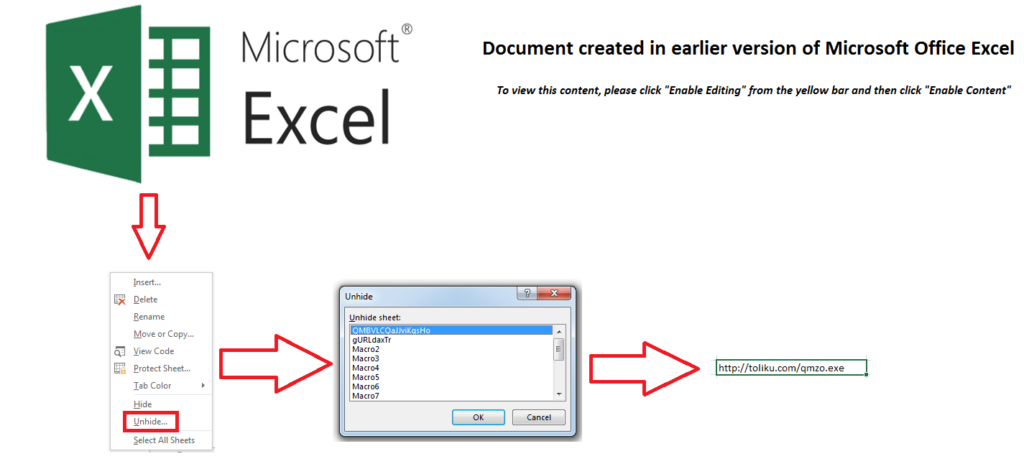
One of the publicly shared malware threats we found in Zendesk belonged to a large retailer in the United States and contained a COVID-19 lure: a malicious Excel file named covid19_<masked>.xls. The threat actor embedded a malicious Excel 4 macro formula in one of the 16 hidden sheets. Excel macros were used instead of the VBA macros commonly used in malicious Excel files, as they are both less likely to be detected by scanning engines and more likely to be enabled in the editor.
The Excel 4 macro formulas are invoked in the workbook by using the “Auto_Open” option to download the next stage payload from toliku[.]com. At the time of analysis, the URL was down and not serving any payload, but was previously serving the Dridex malware.
Figure 1 shows how to view the sheet ‘QMBVLCQaJJviKgsHo’ which contains the malicious URL.
Disclosure
Netskope reported the exposures we uncovered to the affected organizations in July 2020.
Conclusion
This edition of our leaky cloud apps series provided a detailed synopsis of how confidential information gets leaked through misconfigured Zendesk attachment links. We also detailed how malware can spread using Zendesk. We recommend turning on the “Require authentication to download” option to avoid accidental exposure as shown in Figure 2.
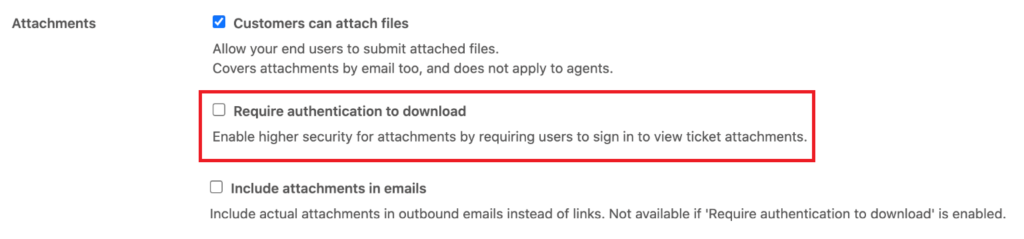
After enabling this option, private linked attachments with the shared file links will now require authentication.


 Leggi il blog